Pushing and pulling sessions between machines
A Claude Code or Codex session lives on one machine at a time. agb push hands
it to another of your machines and agb pull brings it back. On the other side
it resumes as the same session, with the same id and full history, not as a
seeded copy.
flowchart LR
  subgraph laptop
    L["agb<br/>your sessions"]
  end
  subgraph desk["desk (always on)"]
    D["the session<br/>in a herdr tab"]
  end
  L -- "push: Ctrl+O, or agb push desk ID" --> D
  D -- "pull: Ctrl+R then Enter, or agb pull desk ID" --> L
  D -. "herdr / phone" .-> P(["you, away"])
Neither one is a sync. A push copies the session's files to the other machine and replaces what was there. A pull does the same in the other direction. You always run the command on the machine you are sitting at.
A typical day
sequenceDiagram
  actor You
  participant L as laptop (agb)
  participant D as desk (herdr)
  You->>L: work with an agent all morning
  You->>L: quit it, Ctrl+O, Enter (push to desk)
  L->>D: rsync the transcript
  L->>D: arrive hook: open it in a herdr tab
  You-->>D: check on it from your phone
  You->>D: quit it there when you are back
  You->>L: Ctrl+R, pick it, Enter (pull)
  D->>L: rsync the transcript back
  L->>You: it resumes here, same session
In the picker
Click a conversation to select it and click a visible footer action to use
its shortcut. This includes ^o push, ^r desk, and the push panel's
enter push, host and directory controls. Double-clicking a remote
conversation pulls and resumes it here, just like Enter.
Push: Ctrl+O
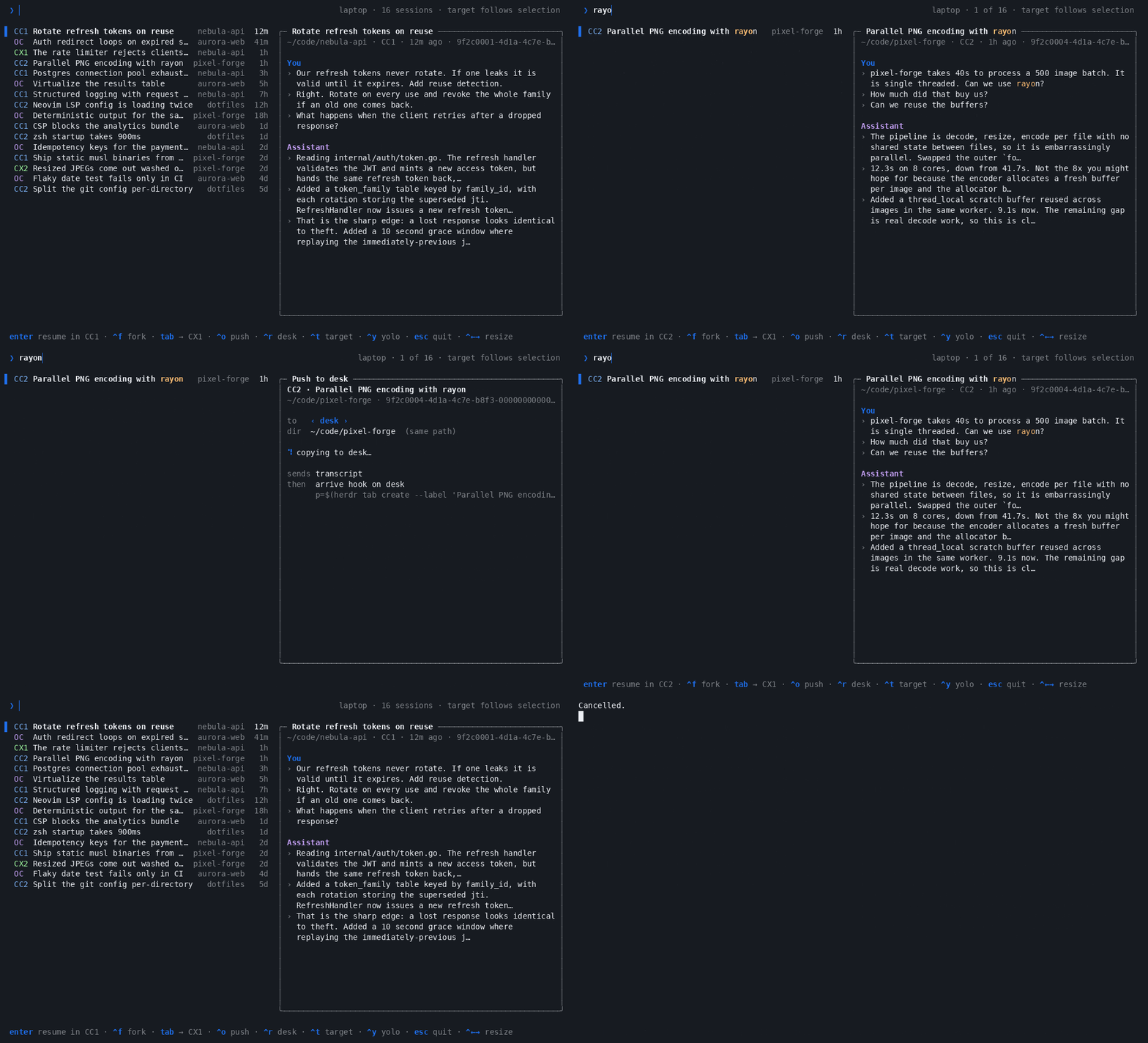
Ctrl+O on a Claude Code or Codex session turns the card into a push panel.
It finds the project on the other machine, checks both sides, and lists what it
will send and what happens once the session is there. Then:
| Key | Does |
|---|---|
Enter |
Push. Shown only when nothing stops it. |
← → |
Another machine from moveHosts |
Ctrl+D |
Another directory there, when the project exists in more than one place |
Ctrl+K |
The session is open here: end it (SIGTERM), check again, and push |
Enter or y |
The project is not on that machine: the panel asks whether to copy it over. Copy it with rsync, check again, and push. The Copy & push button does the same |
n |
Put that question away (Not now); Ctrl+P still copies and pushes |
Esc |
Back to the list |
A line marked ✓ passed, ! is a note that does not stop the push, and ✗
stops it.
Pull: Ctrl+R
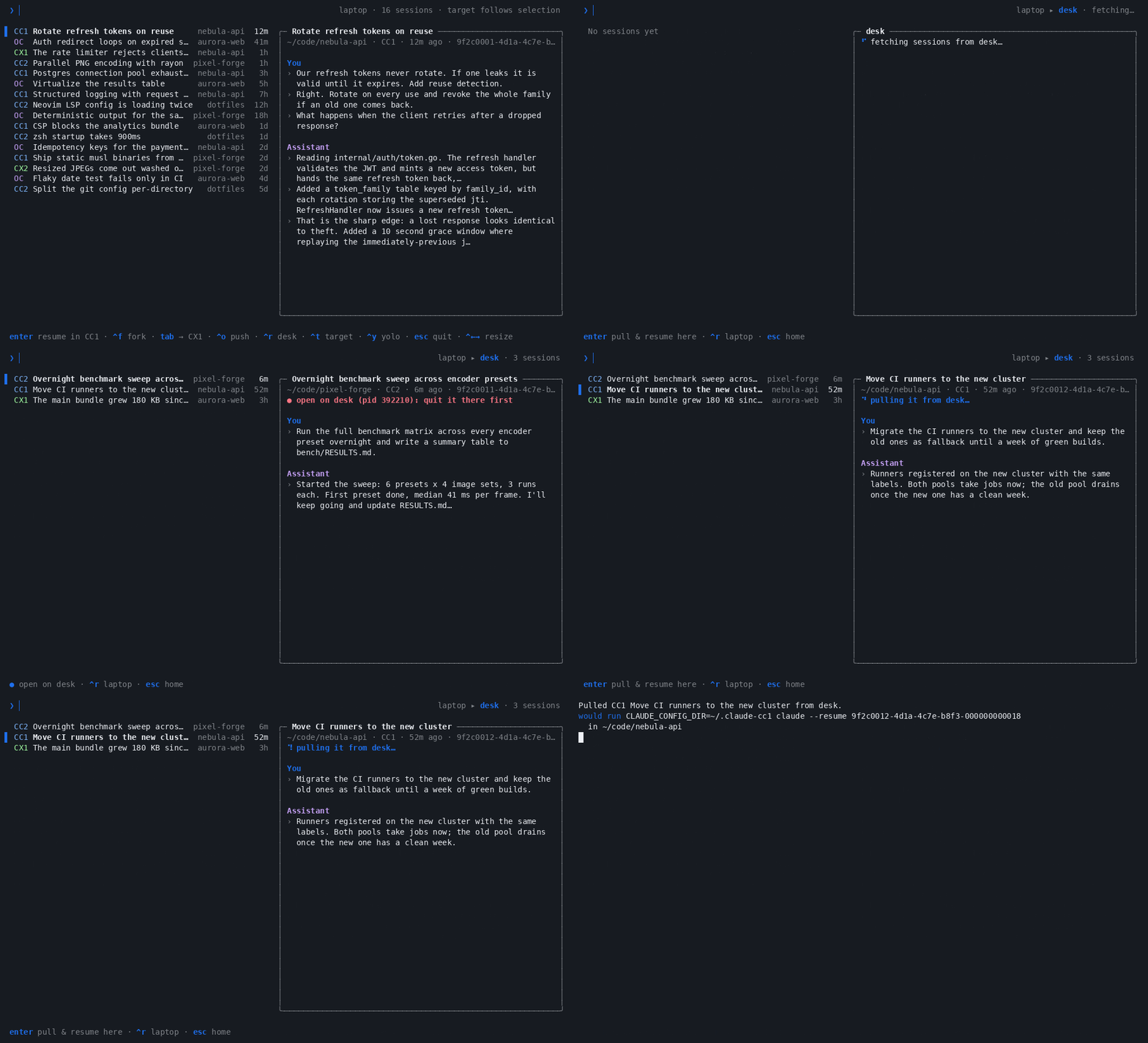
Ctrl+R switches the list to another machine's sessions. The header reads
laptop ▸ desk, and pressing Ctrl+R again steps to the next machine and then
back home. Typing still filters the list. Enter pulls the selected session
and resumes it here, in the account it belongs to. A session that is still open
over there shows ● open on desk and cannot be pulled until you quit it there.
When a pull stops because the project is not on this machine, the card asks
whether to copy it over: Enter, y or Copy & pull copies it with rsync
and pulls, and n or Not now puts the question away (Ctrl+P still does
it).
Esc goes home.
Browsing runs agb --print --json on the other machine over ssh, so agb has
to be installed there.
From the command line
$ agb push desk 0c5ddcb6 --dry-run
Push CC2 0c5ddcb6-… to desk
  Herdr setup and patch diagrams
  in ~/phd
copy     ~/.claude-cc2/projects/-home-sergio-phd/0c5ddcb6-….jsonl
copy     ~/.claude-cc2/projects/-home-sergio-phd/0c5ddcb6-…
merge    ~/.claude-cc2/projects/-home-sergio-phd/memory (newer files there are kept)
Note: ~/phd has uncommitted changes to tracked files; commit and push them so the code goes along
Dry run: nothing copied. There, it would resume with:
  cd '/home/sergio/phd' && CLAUDE_CONFIG_DIR='/home/sergio/.claude-cc2' claude --resume 0c5ddcb6-…

$ agb pull desk 0c5ddcb6
| Command | |
|---|---|
agb push HOST ID |
Push the session. ID may be a prefix. |
agb push ID |
Ask for the host and directory, in plain prompts |
agb pull HOST ID |
Pull it. The session does not have to be known here: it is looked up there by id prefix. |
--dir DIR |
Another directory on the receiving side |
--dry-run |
Check and list, change nothing |
--force |
Go ahead even though it is open on this side, or the copy here or there is bigger (see below) |
--no-arrive |
Push without running the arrive hook |
Setting it up
- Linux on both machines. The checks run GNU
statandfind, read/proc, and copy withrsync --mkpath; macOS has none of these as-is. - Same user, same home path on both machines, and an ssh alias for the
other one (
ssh deskworks without a password). Both commands check the home path and refuse if it differs. - Name the machines in
~/.config/agentbridge/config.json. The same file can be used on every machine; each one leaves itself out of the list.
- Install agb on the other machine too if you want to browse it with
Ctrl+R. agb is a static binary, so copying~/.local/bin/agbover works. It has to be on the PATH thatssh desk 'agb --print'sees. - Optionally, an arrive hook that starts the session once it lands:
"arrive": {
  "desk": "p=$(herdr tab create --label {title} --cwd {dir} --no-focus | jq -r .result.root_pane.pane_id) && herdr pane run \"$p\" {resume}"
}
The hook runs on that machine over ssh after the copy. {resume}, {dir},
{title} and {id} each become one shell word, so leave them unquoted.
This one opens the session in a new herdr tab, where
herdr and its phone client can see it. agb itself knows nothing about herdr:
tmux new-window -d {resume} works just as well. Without a hook, agb prints
the ssh -t command that resumes it there.
What stops it, and what is only a note
| Check | Push | Pull |
|---|---|---|
| The session is open on the receiving side | ✗ stop | ✗ stop |
| The session is open on the sending side | ✗ stop (--force, or Ctrl+K in the picker) |
✗ stop (--force) |
| The receiving side's copy is bigger | ✗ stop (--force) |
✗ stop (--force) |
| Project directory missing on the receiving side | ✗ stop, with an offer to copy it over | ✗ stop, with an offer to copy it over |
| Tool or same home path missing on the receiving side | ✗ stop | ✗ stop |
| Account there does not look logged in | ! note | — |
| Uncommitted or unpushed work, or the two checkouts at different commits | ! note | ! note |
"Open" means any of three things: Claude Code's own record of a running
session (with the process start time, so a reused pid does not count), a process
holding the transcript file open, or a process started to resume it
(claude --resume <id>, codex resume <id>). The last one catches a session
that has not got far enough to do either of the others, such as Claude Code
still waiting at its trust prompt.
"Bigger" is the one guard against losing work. Transcripts only grow, so a bigger copy on the receiving side has turns that this one lacks: the session carried on there. Pull it from there instead of pushing over it. agb compares sizes and nothing more. It keeps no history, so the copy being sent simply replaces the other one.
Code is git's job. agb copies the conversation, not your working tree. When the project has uncommitted changes, an unpushed HEAD, or the other checkout sits at a different commit, you get a note. Commit and push before you go, and pull on the other side.
What travels
| Push | Pull | |
|---|---|---|
| The transcript | replaces the copy there | replaces the copy here |
| Claude's sibling folder (tool results, subagents) | ✓ | ✓ |
| Project memory | merged, newer files kept | merged, newer files kept |
| agb handoffs and other transcripts it names by path | ✓, newer copies there kept | — |
| Background tasks it started | ✗, ask the agent to check them again | ✗ |
OpenCode keeps its sessions in a database, so OpenCode sessions do not travel.
Using herdr on both machines
herdr only sees processes it started itself: a session started with plain
ssh desk claude … never shows up in herdr or on your phone. A setup that
holds together:
- Run agents inside herdr on the laptop too. Run
agbin a herdr pane and open sessions from there. - When something should keep running while you are away, quit it,
Ctrl+O,Enter. The arrive hook opens it in a herdr tab on desk, and your phone follows it there. - When you are back,
Ctrl+R, pick it,Enter. It resumes in the pane you are in.
When something goes wrong
| You see | Why | Do |
|---|---|---|
agb is not installed on desk while browsing |
agb --print --json failed over ssh |
Copy ~/.local/bin/agb to desk, and check that ssh desk 'command -v agb' finds it |
~/phd does not exist on desk |
The project was never cloned or copied there | git clone it there. Or let agb copy it: it asks right after the checks, and the picker asks in a box with Copy & push and Not now. The copy is the printed rsync -a --mkpath … line, so it carries the whole directory, untracked files included |
~/phd does not exist here on a pull |
The project was never cloned or copied here | The same, the other way: git clone it, --dir to another checkout, or answer yes (Copy & pull in the picker) to copy it from desk |
HOME on desk is … |
The two machines have different home paths | Use the same user and home path on both |
the copy is bigger on desk |
The session carried on there | Pull it instead, or --force to throw those turns away |
| Pushed, but nothing appears in herdr | No arrive hook, or it failed | agb push desk ID --dry-run prints the expanded hook; run it on desk to see the error |
open here (pid …), but you quit it |
Something else still holds it: another terminal, or a crashed process | ps -fp PID; Ctrl+K in the picker ends it for you |