AgentBridge
Your sessions and shared agent setup, in one place.
Search every OpenCode, Claude Code and Codex account, carry conversations across tools and machines, and synchronize skills and MCPs.


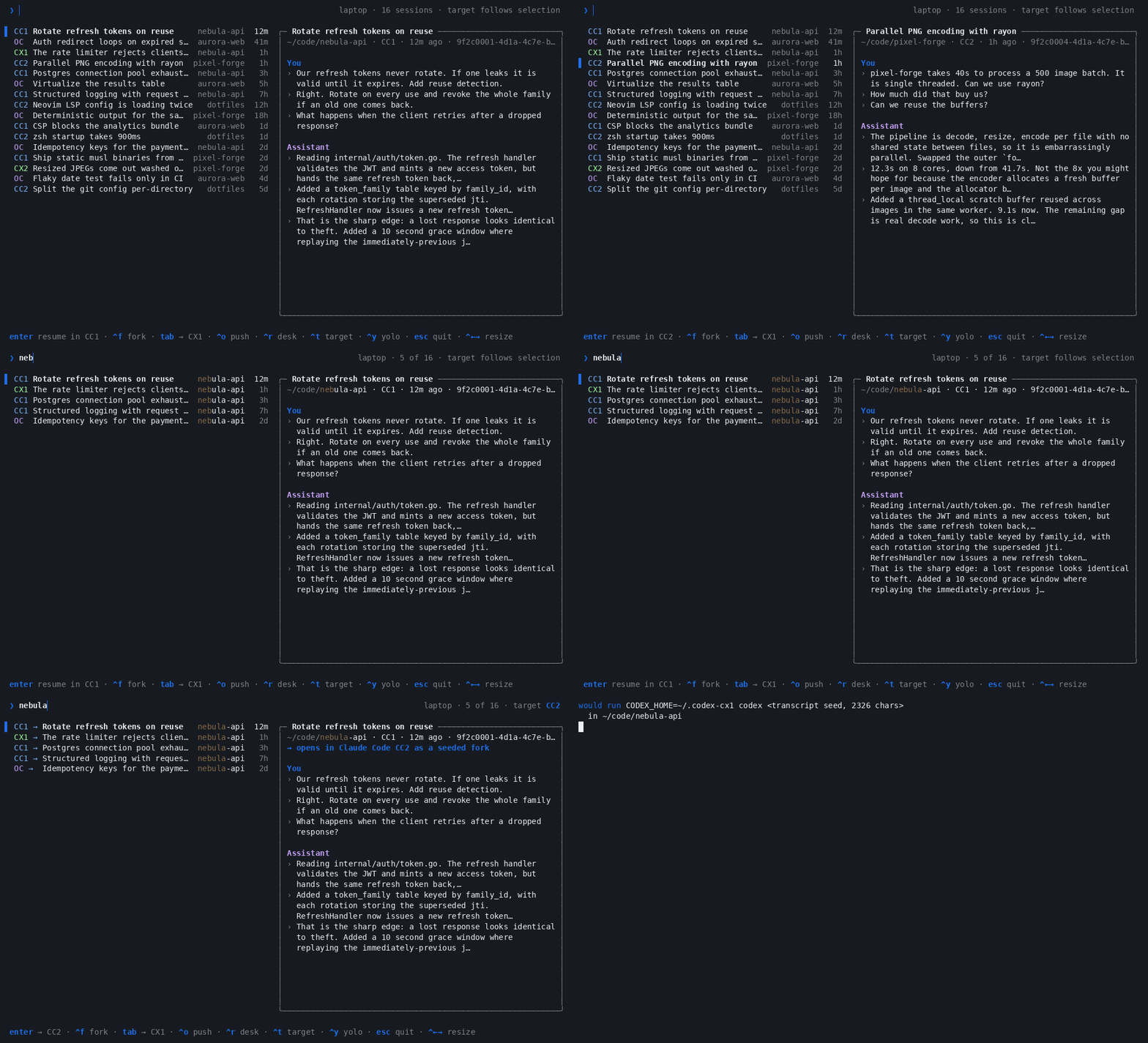
The demo runs against synthetic sessions; see demo/.
Why
Your work is spread across three tools and however many accounts you signed into.
Finding the session where you actually solved something means remembering which
tool you were in, cd-ing to the right repo, then paging through a separate
resume list for every tool and every account.
AgentBridge (agb) reads those stores directly and puts everything in one
list, newest first, searchable by the words you typed rather than only the
title a tool gave it.
It also moves a session between your machines: push it to an always-on box before you leave, follow it from your phone, and pull it back later as the same session. See pushing and pulling.
agb also shares local skills and MCP definitions across tools and accounts
through user-defined profiles. Start with agb setup --example, review with
agb plan, and apply with agb sync. See sharing agent setup
and the broader product design.
Install
Needs Go 1.23+ to build, and at least one of OpenCode, Claude Code and Codex. The result is a single static binary with no runtime to install.
git clone https://github.com/sergio-gimenez/opencode-sessions.git
cd opencode-sessions
make install              # puts `agb` in ~/.local/bin, no root needed
Then:
Upgrades use ~/.config/agentbridge, ~/.cache/agentbridge, and AGB_*.
Move any existing configuration or cache into those directories before removing
an older installation. Running make install removes obsolete command aliases.
Try it without touching your own sessions
That builds a synthetic history (two Claude accounts, two Codex accounts, an
OpenCode store, four invented projects) and runs the real picker against it with
opening stubbed out. A second fake machine, "desk", is there to try Ctrl+O
(push) and Ctrl+R (browse and pull) on. Nothing of yours is read and nothing
gets launched. Details in demo/README.md.
Keys
You can also use the mouse: click a conversation to select it, double-click
to follow the displayed Enter action, and use the wheel over the list to move
the selection. Right-click a conversation for its full action menu, or press
Ctrl+E. Use the wheel or arrow keys to scroll the menu; click an action or
press Enter to choose it. Click a visible footer action to run it, including push,
browse, target and YOLO. The push panel's controls are clickable too. Hold
Shift while dragging to select terminal text in terminals that support it.
| Key | What it does |
|---|---|
| type | Filter by title, directory and your prompts |
↑ ↓ |
Move the selection |
PgUp PgDn Home End |
Jump |
Enter |
Follow the displayed route |
Ctrl+F |
Fork: follow the same route, but branch into a new session |
Ctrl+N |
Start a new conversation: choose an agent/account and project directory |
Ctrl+E or right-click |
Open the selected conversation's action menu |
Ctrl+T |
Cycle the target forwards: OpenCode → each Claude account → each Codex account |
Shift+Tab |
Cycle the target backwards |
Tab |
Open in the next tool right away, as a transcript-seeded fork |
Ctrl+Y |
Toggle yolo: bypass permission checks for this launch only |
Ctrl+O |
Push the session to another machine (push and pull) |
Ctrl+R |
Browse another machine's sessions; Enter there pulls one and resumes it here |
Ctrl+G |
Pin the suggested subscription as the target |
Ctrl+← Ctrl+→ |
Move the divider between the list and the card; the width is remembered |
Esc Ctrl+C |
Cancel |
Reading the list
Each row is one session: where it lives, its title, its project and how long ago it was last touched. The card on the right shows the selected session's directory, account and id, then your latest prompts and the assistant's latest replies, with your search terms highlighted.
| Row starts with | Meaning |
|---|---|
OC |
An OpenCode session, resumed natively. |
CC1 |
A Claude session owned by account cc1, resumed natively. |
CX1 |
A Codex session owned by account cx1, resumed natively. |
CC1 → |
Enter carries it to the pinned target (shown in the header) as a seeded fork. The arrow takes the target tool's colour. |
Until you press Ctrl+T the target follows the selection, so rows show no
arrow and Enter resumes whatever you picked in the account it already belongs
to. Cycling pins a destination: the header shows target CX2, crossing rows get
an arrow, and the card spells out where Enter will open the session. The
footer always says what Enter and Tab will do, and a red YOLO in the
header means the launch will skip permission checks.
The header also suggests the configured subscription with the most headroom.
AgentBridge compares the least remaining capacity across each account's rolling
windows, ignores blocked and unknown accounts, and keeps configuration order as
the tie-breaker. This is advice only: Enter still resumes a session in its own
account unless you pin another target. Ctrl+G pins the suggestion. The
selected target's limits appear in the detail card.
Ctrl+← and Ctrl+→ move the divider between the list and the card, and the
next launch opens with the same split. On macOS those keys switch Spaces by
default; free them under System Settings → Keyboard → Keyboard Shortcuts →
Mission Control if you want them in the terminal. Below 90 columns the card is
hidden and the list takes the whole width.
Starting a new conversation
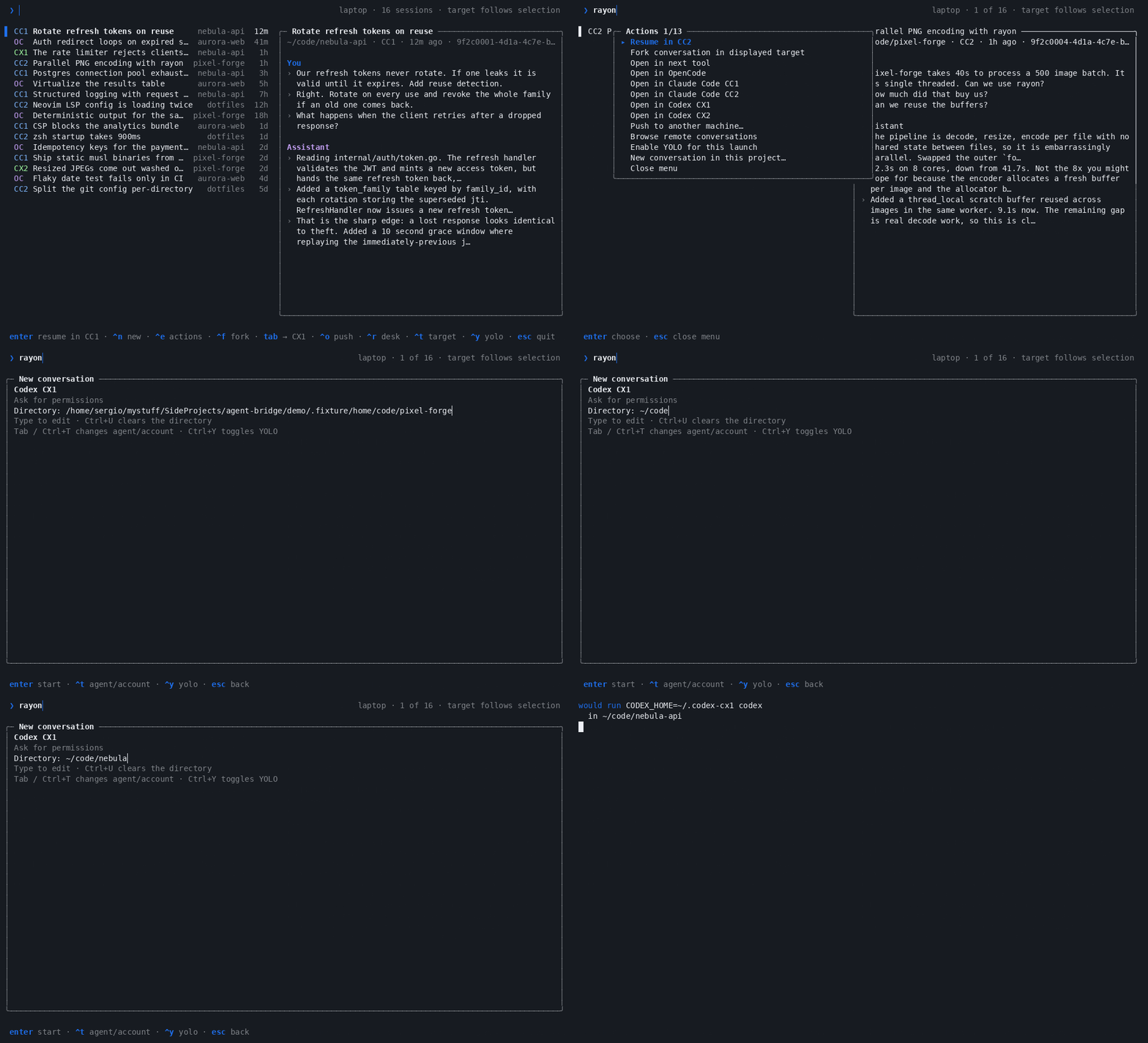
The demo opens a conversation's right-click menu, selects a new conversation in that project, switches to Codex, edits the directory and clicks Start. It uses synthetic sessions and prints the launch command instead of running an agent.
Click ^n new in the footer or press Ctrl+N. Choose the agent and account
with Tab or Ctrl+T, edit the project directory (Ctrl+U clears it), then
press Enter or click enter start. Ctrl+Y toggles YOLO for this launch.
The directory defaults to where you ran agb. The right-click menu also
offers a new conversation in the selected conversation's project.
You can start one directly from the command line:
Without --target, agb new opens the chooser. Without --dir, it uses your
current directory. New conversations start with a blank interactive agent;
they don't resume a session or carry over a transcript. This also works before
you have any saved conversations.
Forking a session
Using the sergio.agb Herdr plugin? Open the picker with Ctrl+B, then A.
For a remote session, connect with
herdr --remote desk --remote-keybindings server so Herdr enables the remote
plugin's shortcut. See Switching agents in Herdr for the full
workflow, including YOLO mode and troubleshooting.
Enter continues the picked session, so new turns land in the original
conversation. Ctrl+F follows the same route but branches: you get a new session
to take in a different direction, and the original stays exactly as you left it.
Inside one tool and account the fork is native, so the copy carries real session state rather than a retelling of it:
opencode --session <id> --fork is OpenCode 1; OpenCode 2's TUI has no fork
flag, so there a fork takes the transcript-seeded path below.
Ids don't survive a hop between tools or between accounts, so across one of those
both Ctrl+F and Enter fall back to the transcript-seeded path below. That
path is already a fork; the original never changes either way.
The right column previews the selected session: title, directory, id, your most
recent prompts, plus recent assistant replies when you pass --assistant. Search
terms light up in both columns.
Migration is a fork, not a move
Cross-tool and cross-account opens do not migrate a session. Ids are not
portable between OpenCode, Claude Code and Codex, or between two accounts of the
same tool, so agb starts a new session in the target and pastes the old
transcript in as context. Consequences worth knowing:
- The original session still sits in its own tool, untouched.
- Ping-ponging (CC → CX → OC …) leaves a chain of partial copies, since every hop rebuilds state from a transcript instead of resuming the real thing.
- Fork from the most recent node, at the top of the list, or you carry a stale branch forward.
Do it deliberately, at a boundary that makes sense: a task is finished, you want
to keep the general context, and you'd rather continue in the other tool. Tab
is not a live round trip, so treat it as "start fresh over there, with this
history".
For long conversations, the handoff includes the opening request, the latest user message, recent turns, and the latest readable compaction summary saved by the source tool, when one exists. Code blocks and line breaks are preserved. The opening prompt is limited to 60,000 bytes, including its metadata; this is a CLI transport limit, not a model-specific token budget. Oversized messages retain their beginning and end, with an explicit omission notice.
Every seeded fork saves an untruncated copy of the extracted user and assistant
text in ~/.cache/agentbridge/handoffs/, beside the index cache, and gives the target
agent its absolute path. Turns are numbered so omitted details can be read in
ranges. The file also points to the source JSONL for tool outputs and attachments;
OpenCode's complete JSON export is saved alongside the readable transcript.
Files are private to your user, and later forks keep earlier snapshots valid.
agb reuses saved summaries rather than making a new model call. When history
is omitted from the prompt, it instructs the target agent to recover requirements
and decisions from the saved transcript before acting. Encrypted compaction
checkpoints cannot be reused as readable summaries across tools. Handoff files
remain until you remove them; deleting them removes that recovery path from
sessions that reference them. Dry runs also prepare these files.
Pushing and pulling a session between machines
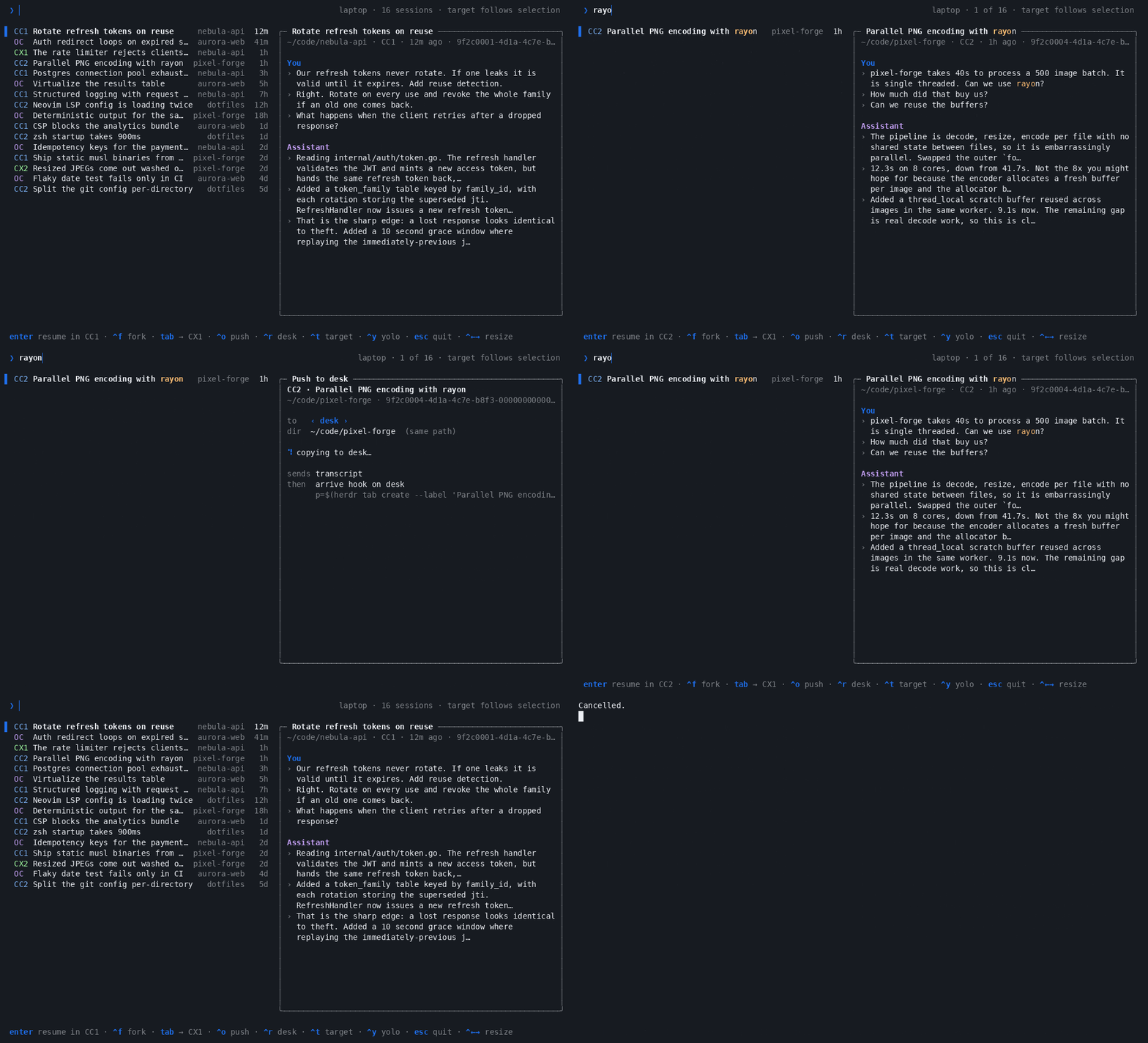
A Claude Code or Codex session lives on one machine at a time. Ctrl+O in the
picker (or agb push desk ID) hands it to another of your machines, and
Ctrl+R (or agb pull desk ID) browses that machine and brings one back. On
the other side it resumes as the same session, not as a seeded fork.
 laptop                                   desk
┌────────────┐   push  Ctrl+O  ───────►  ┌────────────┐
│ your list  │                           │ herdr tab  │──► phone
│            │   ◄───  Ctrl+R ↵  pull    │            │
└────────────┘                           └────────────┘
 stops only if it is open on either side, or the other copy is bigger
Neither is a sync. The copy being sent replaces the other one. Code travels
through git, so a dirty checkout gets a note, never a stop. An arrive hook per
host can start the session once it lands, for example in a
herdr tab where your phone can follow it.
Setup, the checks, what travels, and troubleshooting: docs/push-pull.md.
Sharing memory between tools
A fork carries the conversation, not what the agent has saved to memory.
Claude Code keeps that in ~/.claude/projects/<project>/memory/, and two
third-party plugins let the other tools use the same files.
make install suggests whichever ones you're missing.
- OpenCode:
opencode-claude-memoryreads and writes the memory directory and respectsCLAUDE_CONFIG_DIR. Add"plugin": ["opencode-claude-memory"]toopencode.json. - Codex:
codex-claude-memory-pluginloads the project'sMEMORY.mdwhen a session starts and writes to it only when you ask Codex to remember something. It is young and always reads~/.claude, so other Claude accounts' memory isn't picked up.
codex plugin marketplace add gaboe/codex-claude-memory-plugin
codex plugin add codex-claude-memory-plugin@codex-claude-memory
Rendering diagrams in every tool
A forked session often carries a diagram with it. claude-mermaid
is a single stdio MCP server that renders Mermaid and live-reloads a browser
preview, so all three tools can point at the same binary and a diagram looks the
same wherever the session lands. make install suggests it for the
tools that don't have it wired up yet.
- Claude Code:
claude mcp add --scope user mermaid claude-mermaid, or install the plugin with/plugin marketplace add veelenga/claude-mermaid. - OpenCode: add the server to
opencode.json.
- Codex: add the server to
~/.codex/config.toml.
The repository also ships a mermaid-diagrams skill. It is written for Claude
Code, but the file drops into ~/.codex/skills/ and
~/.config/opencode/skill/ as-is once you remove its allowed-tools: line,
which names Claude Code's tool ids. The preview opens a local browser tab, so it
is only useful for sessions running on your own machine.
For diagrams the agent should keep editing, mcp-excalidraw-server
gives every tool the same live Excalidraw canvas. The agent can draw on it, take
a screenshot, fix what it sees and export a .excalidraw file. It is again one
stdio binary, and it starts the canvas on 127.0.0.1:3000 by itself.
- Claude Code:
claude mcp add --scope user excalidraw -- mcp-excalidraw-server - OpenCode:
"excalidraw": { "type": "local", "command": ["mcp-excalidraw-server"], "enabled": true }under"mcp"inopencode.json. - Codex:
codex mcp add excalidraw -- mcp-excalidraw-server
Its skill has no tool ids in it, so one command installs it for each tool:
for root in ~/.claude/skills ~/.codex/skills ~/.config/opencode/skill; do
  mcp-excalidraw-server install-skill --dir "$root"
done
Multiple accounts
OpenCode wrappers with separate stores can appear as additional targets while
keeping the default oc target. For example:
{
  "opencodeAccounts": [
    {
      "name": "opencode-i2cat",
      "command": "opencode-i2cat",
      "dbPath": "~/.local/share/opencode-i2cat-v1/opencode/opencode.db",
      "configHome": "~/.config/opencode-i2cat-v1"
    }
  ]
}
command names an executable or wrapper on your PATH (or an absolute path);
the wrapper sets its own environment. dbPath identifies its session store.
configHome optionally sets the XDG configuration root used by setup plans.
Run agb --target opencode-i2cat or choose it with Ctrl+T; agb new --target
opencode-i2cat starts a blank conversation. Switching between isolated stores
creates a transcript-seeded fork, while resuming within a store uses its wrapper
and original session ID. Each store gets its own session cache.
Claude Code and Codex each keep credentials, config and session history under a single home directory, which makes a second account nothing more than a second home. Use each tool's normal home for the first account and an isolated one for every account after that:
cc1() { command claude "$@"; }
cc2() { CLAUDE_CONFIG_DIR="$HOME/.claude-cc2" command claude "$@"; }

cx1() { command codex "$@"; }
cx2() { CODEX_HOME="$HOME/.codex-cx2" command codex "$@"; }
Authenticate each once (cc2 auth login, cx2 login), then tell agb about
them in ~/.config/agentbridge/config.json:
{
  "skipPermissions": false,
  "claudeAccounts": [
    { "name": "cc1" },
    { "name": "cc2", "configDir": "~/.claude-cc2" }
  ],
  "defaultClaudeAccount": "cc1",
  "codexAccounts": [
    { "name": "cx1" },
    { "name": "cx2", "codexHome": "~/.codex-cx2" }
  ],
  "defaultCodexAccount": "cx1"
}
Omit configDir or codexHome for the tool's normal default account. agb scans
each account's own store and remembers which account owns what, so a cc1
session resumes in cc1 unless you deliberately retarget it.
Leave either block out and agb falls back to that tool's default home, labelling
it [CC] or [CX].
Pick the starting target from the command line when that helps:
agb --target cx2            # any account name, or "oc" for OpenCode
agb --claude-account cc2    # the same thing, said the long way
agb --codex-account cx2
Full setup, verification and troubleshooting lives in Using multiple Claude Code accounts and Using multiple Codex accounts.
Permissions
Launch the target tool with permission checks bypassed
(claude --dangerously-skip-permissions / opencode --auto /
codex --dangerously-bypass-approvals-and-sandbox):
agb --dangerous     # also --skip-permissions / --yolo
agb --safe          # force checks back on, overriding the config default
To go yolo just once, press Ctrl+Y in the picker. The status line turns into a
red YOLO for the launch you are about to make; press it again to go back to
asking. Nothing is saved.
Defaults live in ~/.config/agentbridge/config.json, globally or per agent:
{
  "skipPermissions": false,
  "opencode": { "skipPermissions": true },
  "claudeAccounts": [
    { "name": "cc1" },
    { "name": "cc2", "configDir": "~/.claude-cc2", "skipPermissions": true }
  ],
  "codexAccounts": [{ "name": "cx1", "skipPermissions": true }]
}
What wins, strongest first:
The setting follows the target, not the session: forking a cc1 session into
cx1 uses cx1's default.
Note Skipping permission checks lets the agent act on your filesystem without prompting. Turn it on only for directories where you accept that.
Command line
Press F1 in the picker or any of its dialogs to open the built-in guide.
With an empty search, ? opens it too. Scroll with arrow keys, PgUp/PgDn,
Home/End or the mouse wheel; Esc returns to your previous view.
The guide covers routing, forks, accounts, permissions, transfers and shared
setup. Run agb help to read the same guide and command reference in your shell.
| Flag | Effect |
|---|---|
--print |
List the 25 most recent sessions and exit, no picker |
--query <text> |
Start the picker with a filter already applied |
--assistant |
Search assistant replies too, not just your prompts |
--target <name> |
Start with this target: oc, or any configured account name |
--claude-account <name> |
Same, named for Claude accounts |
--codex-account <name> |
Same, named for Codex accounts |
--dangerous, --skip-permissions, --yolo |
Bypass permission checks |
--safe, --no-skip-permissions |
Force permission checks on |
--rescan |
Ignore the session cache and rebuild it |
--print --json |
List sessions as JSON, with whether each is open (what Ctrl+R reads from another machine) |
--help, -h |
Usage |
| Command | Effect |
|---|---|
agb new [--target NAME] [--dir DIR] |
Start a blank conversation, or open its chooser |
agb push HOST ID |
Push a session to another machine (push and pull) |
agb push ID |
The same, asking for the host and directory |
agb pull HOST ID |
Pull a session from another machine |
agb limits |
Show subscription headroom and the suggested target |
agb limits --json |
Stable target/limit report for launchers and integrations |
agb limits --refresh |
Bypass the two-minute usage cache |
agb setup, agb plan, agb sync |
Shared skills and MCPs (setup) |
Subscription suggestions
Claude Code limits come from the account's OAuth usage endpoint; Codex limits
come through its local app-server protocol. Each configured account is checked
with its own CLAUDE_CONFIG_DIR or CODEX_HOME. OpenCode is provider-agnostic,
so it remains unknown until it has a provider-neutral usage interface.
These are CLI-owned interfaces rather than a shared industry API; an older or
changed client degrades to unknown or the last cached observation.
Checks run after the picker's first frame and never delay opening it. A
two-minute snapshot lives in ~/.cache/agentbridge/limits.json with mode 0600.
It contains target names, percentages and reset times only—never access or
refresh tokens. If a refresh fails, the previous observation remains available
with its original timestamp. agb limits --json exposes the same
provider-neutral report so external tools do not need to read AgentBridge's
configuration or know provider APIs.
Dry run
Set AGB_DRY_RUN=1 and agb prints what it would launch (the command, the
account, the working directory) instead of launching it. Handy for checking how
a route resolves, and for bug reports:
$ AGB_DRY_RUN=1 agb
would run CODEX_HOME=~/.codex-cx1 codex <transcript seed, 1655 chars>
  in ~/code/nebula-api
Where the data comes from
agb reads each tool's existing store and never writes to them.
| Source | Path | Override |
|---|---|---|
| OpenCode | ~/.local/share/opencode/opencode.db (SQLite) |
OPENCODE_DB_PATH |
| Claude Code | ~/.claude/projects/**/*.jsonl, plus each account's configDir |
CLAUDE_PROJECTS_PATH |
| Codex | ~/.codex/sessions/**/rollout-*.jsonl, plus each account's codexHome |
CODEX_HOME, CODEX_SESSIONS_PATH |
agb config |
~/.config/agentbridge/config.json |
AGB_CONFIG_PATH |
agb cache |
~/.cache/agentbridge/index.gob |
AGB_CACHE_PATH, XDG_CACHE_HOME |
| Picker layout | ~/.cache/agentbridge/layout.json, beside the cache |
follows the cache |
| Subscription limits | ~/.cache/agentbridge/limits.json, beside the cache |
follows the cache |
| Fork handoffs | ~/.cache/agentbridge/handoffs/, beside the cache |
follows the cache |
agb skips a store that's missing or unreadable instead of dying on it, so not
having OpenCode installed still gets you your Claude and Codex sessions.
Codex files each session as a rollout under sessions/YYYY/MM/DD/ and archives
one by moving it into archived_sessions/, so archived Codex sessions drop out
of the list the way archived OpenCode ones do. Codex stores no title in the
rollout, which is why a Codex row is titled by its opening prompt.
Why it starts fast
Reading every transcript on every launch is what used to make agb slow: on a
machine with a few hundred sessions that is hundreds of megabytes of JSONL. Now
agb keeps a cache of what each transcript boiled down to and only reads what
changed since the last launch:
flowchart LR
  L[launch] -->|stat every .jsonl| C{size, mtime, inode<br/>vs cache}
  C -->|unchanged| R[cached record]
  C -->|grew, same head and tail bytes| A[parse only the appended lines]
  C -->|new, shrunk or rewritten| F[parse the whole file]
  L -->|list 200 newest sessions| O{time_updated<br/>vs cache}
  O -->|unchanged| R
  O -->|moved| Q[query that session's prompts]
Claude Code and Codex only ever append to a transcript, so the session you are
in the middle of, usually the biggest and the only one that changed, costs just
its new lines. The first launch builds the cache and takes as long as a full
read; after that the picker is up in a few tens of milliseconds. The cache is
safe to delete, and agb --rescan rebuilds it.
Development
go run ./cmd/agb            # run the picker from source
go run ./cmd/agb --print    # list recent sessions, no TUI
make demo                   # picker against synthetic sessions, opening stubbed out
make demo-record DEMO=push  # re-record a demo (DEMO= empty, push or pull), then make demo-gif
make vet test build
See CONTRIBUTING.md.
License
MIT © Sergio Gimenez